April 16, 2026
ChatGPT translation prompts: how to get better results in 2026
You've pasted text into ChatGPT and asked it to translate. The result came back fluent, grammatically clean — and subtly wrong. The tone shifted. A term was rendered too literally. A cultural reference landed flat. It sounded like a translation.
The first instinct is to blame the model. Usually the problem is the prompt. ChatGPT (and its successor GPT models) are capable of producing highly accurate, natural-sounding translations — but the quality of the output is almost entirely determined by the quality of the instructions you give it.
This guide covers how to write prompts that get ChatGPT to translate the way you need: with the right tone, dialect, register, and domain-specific accuracy. It also covers something most prompt guides skip: the ceiling of what even a perfect prompt can achieve, and what to do when you need certainty rather than just improvement.
In this article
- Can ChatGPT be used for translation?
- Which ChatGPT model is best for translation in 2026?
- How to measure ChatGPT's translation accuracy
- How to prompt ChatGPT for translation
- How to enhance your prompts for better results
- How to handle ambiguities and cultural nuances
- Common mistakes to avoid
- Advanced prompt techniques
- When prompting isn't enough
- FAQs
Can ChatGPT be used for translation?
Yes — and for many translation tasks, it performs very well. Unlike rule-based machine translation systems, ChatGPT generates translations by modelling language at a deep contextual level, which makes it better at handling idiomatic expressions, tone shifts, and domain-specific phrasing than earlier systems.
According to Intento's State of Translation Automation 2025, GPT-4.1 ranked first among single-agent solutions across 11 language pairs in human LQA evaluation — outperforming most dedicated neural machine translation engines. ChatGPT is not a translation afterthought; it is genuinely competitive with purpose-built tools for many professional language pairs.
That said, it has real limitations:
Where ChatGPT performs well: Idiomatic and conversational language, tone and formality adaptation, contextual phrasing, marketing and creative content, professional European and major Asian language pairs.
Where it struggles: Highly technical or regulated terminology without explicit guidance, rare and low-resource language pairs, and (critically) verifying its own output. ChatGPT produces one answer. It has no mechanism to check whether that answer is correct.
For quick, general, or moderate-stakes translations, a well-prompted ChatGPT session is efficient and capable. For high-stakes content (legal, medical, financial, or client-facing), prompting alone does not eliminate the risk that the output contains an error you cannot detect.
Which ChatGPT model is best for translation in 2026?
OpenAI has released several model generations since GPT-4, and each has improved meaningfully on translation tasks. Here is where things stand as of April 2026:
GPT-4.1 (released April 2025) — The strongest OpenAI model specifically evaluated on translation benchmarks. Intento's State of Translation Automation 2025 ranked GPT-4.1 first among single-agent solutions across 11 language pairs in human LQA scoring, with 7 "best" performances — more than any other single model tested. It handles complex sentence structures, technical terminology, and dialect differentiation well. If you have API access and are building a translation workflow, GPT-4.1 is the most translation-optimised OpenAI model with independent benchmark support.
GPT-5 / GPT-5.4 (released August 2025 / March 2026) — OpenAI's most advanced models as of 2026. GPT-5.4 scores 92.0% on GPQA Diamond (PhD-level scientific reasoning) and shows a 33% reduction in false claims compared to earlier models. For professional translation tasks involving complex factual content (scientific papers, research reports, technical documentation), GPT-5.4's improved reasoning and lower hallucination rate make it the stronger choice over GPT-4.1 for high-precision work.
GPT-4o and earlier — Still accessible in some contexts but no longer the leading recommendation. For any professional translation use case, GPT-4.1 or GPT-5.4 will produce better results.
Summary: For most translation tasks, use GPT-4.1 or GPT-5.4. GPT-4.1 has the strongest translation-specific benchmark support; GPT-5.4 is the better choice when accuracy on complex factual content is the priority.
How to measure ChatGPT's translation accuracy
Before investing heavily in prompt refinement, it helps to understand what you're measuring and what tools you have.
Manual methods:
- Compare the output against another tool (DeepL, Google Translate) to check for major divergences — not to crown a winner, but to flag where different models interpret the source text differently.
- Read the translation aloud. Awkward phrasing, unnatural rhythm, and wrong-register sentences often become more obvious when spoken.
- Ask a native speaker to review for cultural appropriateness, especially for marketing, consumer, or public-facing content.
- Ask ChatGPT to explain a translation choice: "Why did you use X instead of Y?" The explanation can reveal whether it understood the source context correctly.
Structured method:
MachineTranslation.com's Translation Quality Score provides a real-time confidence signal for every translation — without requiring a manual comparison, a native speaker review, or a follow-up prompt. The score reflects how aligned the output is across multiple AI models, giving you a measurable indicator of reliability before you use the translation. For professional or regulated content, this removes the guesswork from the accuracy check.
For content where any error creates liability (legal, medical, financial) combining structured quality scoring with in-platform human verification provides the highest level of assurance.
How to prompt ChatGPT for translation
The quality of your translation is almost entirely determined by how well you specify what you need. ChatGPT will fill in any gaps you leave with its own defaults — which may not match your tone, audience, or field.
The basics of a good translation prompt
Every effective translation prompt should specify at minimum: the source language (or ask ChatGPT to detect it), the target language, and the tone or register you need. Without these, ChatGPT will make assumptions — and assumptions produce inconsistent output.
A reliable basic structure:
"Translate the following text into [target language]. Maintain a [formal/informal/professional/conversational] tone. [Paste text here]."
For example:
"Translate the following text into Spanish. Keep the tone friendly and informal. [Paste text here]."
This gives ChatGPT enough to produce a translation that fits the context. From here, you layer in specificity.
How to enhance your prompts for better results
The difference between a generic translation and a useful one is almost always in the detail you provide upfront.
Specify the dialect. Spanish varies significantly between Spain, Mexico, Argentina, and other regions. French differs between France and Quebec. If you need a specific regional variety, name it explicitly:
"Translate into Mexican Spanish, not Castilian Spanish."
Name the target audience. A translation for engineers and one for end consumers require different vocabulary and register:
"Translate into formal German for a business audience."
Give domain context. If the text contains field-specific terminology, flag it:
"Translate this pharmaceutical document into Japanese. Preserve clinical terminology accurately."
Specify what to preserve. If brand names, product names, or specific phrases should not be translated:
"Do not translate the product name 'Nexalis'. Keep it in English."
The more context you provide upfront, the less correction you'll need after.
How to handle ambiguities and cultural nuances
Idioms, cultural references, and figurative language are where ChatGPT translation most frequently needs guidance. If you don't tell ChatGPT how to handle an ambiguous phrase, it will make a choice — and that choice may preserve the words but lose the meaning.
For idioms: Explain what the expression means, not just what it says:
"Translate 'break a leg' into French, preserving its idiomatic meaning of 'good luck' rather than translating it literally."
For marketing or creative content: Ask for localisation, not just translation:
"Localise this ad copy for a Brazilian Portuguese audience. Adapt cultural references so they resonate locally rather than translating them word for word."
For ambiguous terms: Flag the ambiguity explicitly:
"The word 'right' here means correct, not the direction. Please translate accordingly."
Providing this context upfront avoids the back-and-forth of catching a misinterpretation after the fact.
Common mistakes to avoid
Prompting without specifying the language pair. "Translate this" gives ChatGPT nothing to work with. Always name both the target language and dialect if it matters.
Ignoring tone. Without a tone instruction, ChatGPT defaults to a neutral, slightly formal register. For casual, marketing, or brand-voice translations, this default will feel wrong.
Treating the first output as final. ChatGPT is designed for iterative refinement. If the first translation is close but not quite right, follow up: "The second paragraph is too formal, can you make it more conversational?" This back-and-forth is the intended workflow, not a workaround.
Assuming technical accuracy without verification. ChatGPT produces fluent output. Fluency and accuracy are not the same thing. In MachineTranslation.com's internal benchmark across 5,000 words of mixed technical and marketing content, ChatGPT scored 89.8% accuracy, but hallucinated content in two specific sentences. Fluency does not signal where the errors are.
Prompting as if it solves the verification problem. A better prompt reduces avoidable errors. It does not eliminate the structural limitation that ChatGPT, as a single model, cannot verify its own output. Individual LLMs hallucinate between 10% and 18% of the time on translation tasks, according to data synthesised from Intento's State of Translation Automation 2025 and WMT24 General Machine Translation Findings. Prompting reduces the rate; it does not eliminate it.
Advanced prompt techniques
For specialised, high-volume, or high-stakes translation work, basic prompts are a floor, not a ceiling. These techniques push the output further.
Role assignment. Assigning ChatGPT a specific role anchors its vocabulary, tone, and decision-making:
"You are a certified legal translator specialising in EU contract law. Translate the following document into French, preserving all legal terminology precisely."
Multi-step prompting. Breaking the task into phases gives you control over each output:
"First, translate this text into German literally. Then, in a second pass, adapt it for natural German flow without changing the meaning."
This lets you compare the raw translation with the adapted version and identify where meaning was adjusted.
Glossary injection. If you have specific terminology that must be rendered consistently, provide it:
"Use these term mappings throughout: 'onboarding' → 'Einarbeitung', 'dashboard' → 'Dashboard' (keep in English). Translate the following into German."
Side-by-side output requests. For quality-checking purposes:
"Translate this paragraph into Spanish and then show me the original and translation side by side."
Sample prompts by content type:
- Marketing: "Translate this ad copy into Brazilian Portuguese. Make it persuasive and culturally resonant for a young urban audience."
- Legal: "Translate this contract clause into French. Preserve the legal terminology and do not paraphrase."
- Technical: "Translate this user manual section into Japanese using accurate engineering terminology. Prioritise precision over naturalness."
- Multilingual: "Translate this text into Spanish, German, and Simplified Chinese. Flag any terms that don't have a direct equivalent."
When prompting isn't enough
Good prompts make ChatGPT's output significantly better. They reduce avoidable errors from missing context, wrong tone, or unchecked assumptions. For the majority of everyday translation tasks, a well-constructed prompt produces output that is accurate, natural, and ready to use.
But there is a ceiling. No prompt (however detailed) can make ChatGPT verify its own output. A single model cannot catch its own hallucinations. When ChatGPT renders a legal term incorrectly or introduces a factually wrong phrase in a technical document, the output looks the same as when it gets everything right: fluent and confident.
This is the structural limitation that MachineTranslation.com's SMART system addresses directly. Instead of prompting one model and hoping it is right, SMART runs every translation through 22 AI models simultaneously (including ChatGPT, Claude, Gemini, DeepL, Google, and 17 others) then applies a consensus audit: the translation that the majority of models agree on is selected. Because hallucinations are model-specific, cross-model agreement filters them out by design.
Internal benchmarks show SMART achieves an aggregated quality score of 98.5 out of 100 (compared to GPT-4o at 94.2) and reduces critical translation error risk by 90%. Translations run through SMART reduce critical errors to under 2%, compared to the 10–18% hallucination rate for single-model LLMs. (Source: MachineTranslation.com internal reports; Intento State of Translation Automation 2025; WMT24 General Machine Translation Findings.)
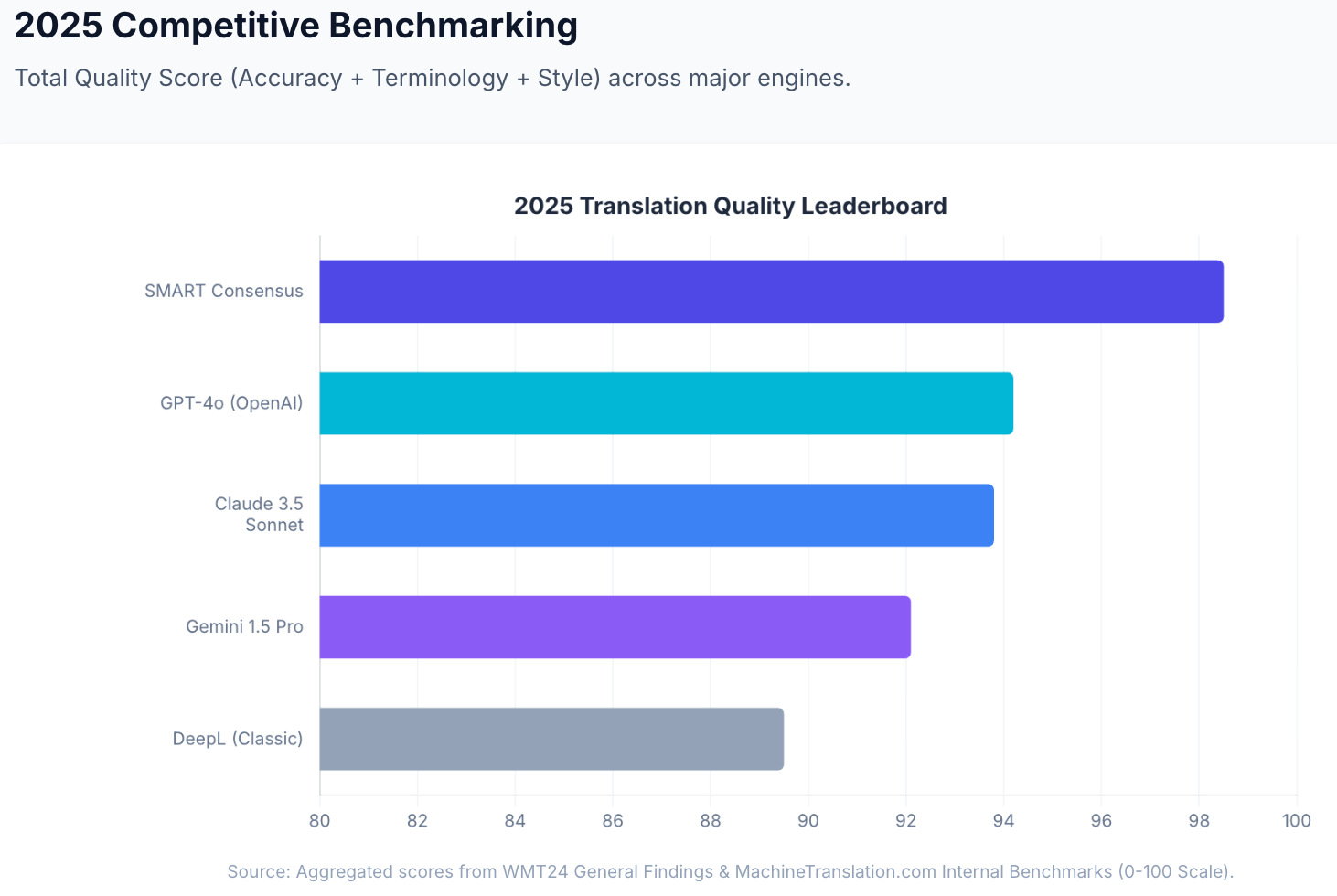
For translations that must be right (legal submissions, medical content, client-facing documents), human verification is available within the same platform. No external agency. 100% accuracy guaranteed.
Start translating at MachineTranslation.com — free, no sign-up required. ChatGPT is one of the 22 models MachineTranslation.com runs for you.
FAQs
1. What is the best ChatGPT model for translation in 2026?
GPT-4.1 is the most translation-optimised OpenAI model with independent benchmark support, ranking first among single-agent solutions across 11 language pairs in Intento's State of Translation Automation 2025 human LQA evaluation. GPT-5.4 (released March 2026) is the most capable current model and the better choice for complex factual or technical content where hallucination reduction matters most.
2. How do I get ChatGPT to translate more accurately?
The most effective steps are: specify the language pair and dialect explicitly, give the target audience and domain context, indicate the required tone and formality level, and flag any idioms or technical terms that need special handling. For high-stakes content, combine a well-structured prompt with a cross-model consensus tool like MachineTranslation.com's SMART, which runs ChatGPT alongside 21 other models and selects the output the majority agrees on.
3. Can ChatGPT translate documents accurately?
ChatGPT can translate pasted text from documents accurately for many content types, but it requires reformatting after translation — unlike dedicated document translation tools. MachineTranslation.com supports file uploads up to 30MB across PDF, DOCX, TXT, CSV, XLSX, and image formats, with original layout preserved in DOCX and open PDFs, so no reformatting is needed after translation.
4. Does ChatGPT hallucinate during translation?
Yes. In MachineTranslation.com's internal benchmark across 5,000 words of mixed technical and marketing content, ChatGPT scored 89.8% accuracy but hallucinated content in two specific sentences. Across the industry, single-model LLMs hallucinate or fabricate content between 10% and 18% of the time on translation tasks (Intento State of Translation Automation 2025; WMT24). Better prompts reduce avoidable errors but do not eliminate the underlying verification gap.
5. Is there a way to check ChatGPT's translation quality automatically?
Yes. MachineTranslation.com's Translation Quality Score provides a real-time confidence signal for every translation, reflecting how aligned the output is across multiple AI models. This removes the need for manual comparisons or native-speaker spot checks as a first-pass quality check. For absolute certainty, in-platform human verification delivers 100% accuracy guaranteed.
6. What's the difference between translating and localising in ChatGPT?
Translation converts text from one language to another as faithfully as possible to the source. Localisation adapts the content for the cultural context and audience of the target language — adjusting references, idioms, tone, and framing so it resonates naturally rather than reading like a translated document. In your prompts, use "localise" instead of "translate" when you want the latter. For example: "Localise this campaign copy for a Spanish-speaking Mexican audience" will produce meaningfully different output than "Translate this into Spanish."
ChatGPT is one of the 22 AI models MachineTranslation.com runs simultaneously. Start translating free at MachineTranslation.com, no sign-up required.